What are bounces?
And what influence do they have on the success of your email marketing?
In this article, you will learn:
- What is meant by a bounce
- What is the bounce rate?
- What types of bounces are there?
- How mail2many bounces
- How you can improve your recipient quality and thus your deliverability
What is a bounce?
The word "bounce" comes from English and means "to rebound." A bounce therefore refers to an email that cannot be delivered to a recipient's mailbox for technical reasons.
Bounces are an important metric in email marketing because they provide information about the quality of the recipient data and, accordingly, about the deliverability and success of the email campaign. Bounces can also influence the deliverability of future email campaigns.
What is the bounce rate?
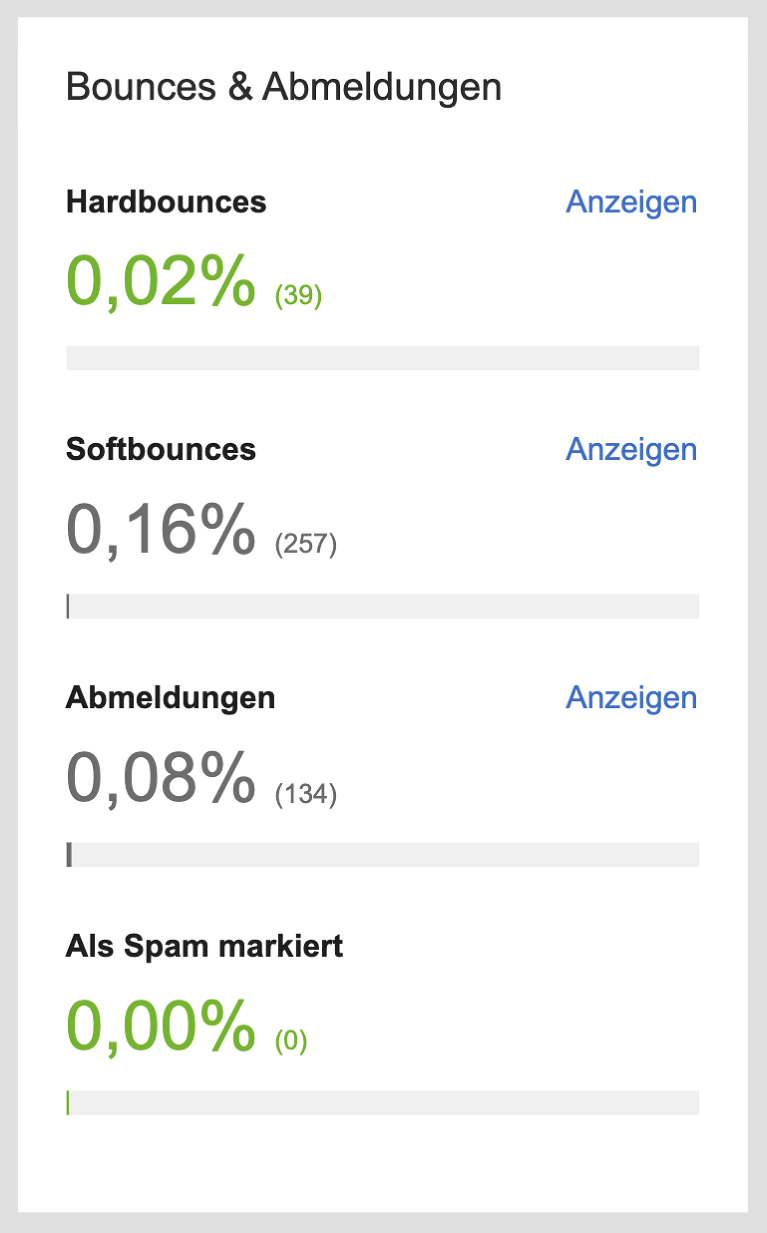
The bounce rate indicates the proportion of bounces in relation to the total number of recipients of the respective mailing. It is calculated as follows:
Bounces / Number of emails sent x 100 = Bounce rate in %
As a general rule, it is desirable to have as low a bounce rate as possible. If the value is above 2%, it is essential to check the quality of your recipient addresses.
What types of bounces are there?
If a bounce occurs, the receiving mail server generates an automated error code and returns it as a response to the sending mail server. Depending on the error code, conclusions can be drawn about the reasons for non-delivery and the bounces can thus be categorized:
Soft bounces
Soft bounces refer to emails that are temporarily undeliverable.
Reasons for this may include, for example, the recipients' mailboxes being full, the receiving server being overloaded, or the recipients' out-of-office assistants being activated.
Hard bounces
Hard bounces occur when emails are permanently undeliverable.
A hard bounce occurs, for example, when the email addresses of the recipients in question do not exist, the address is invalid due to a typo, or the receiving server blocks the delivery of emails from the sending server.
One-hit bounces
OneHit bounces are specific hard bounces that result in the immediate archiving of the recipient in question based on the code returned by the receiving server. A OneHit bounce occurs when the recipient does not exist.
How does mail2many bounces and why?
Depending on the type of bounce, mail2many responds mail2many follows:
soft bounces
Soft bounces do not (yet) have any effect on the respective recipients.
Hard bounces
After the third hard bounce at the latest, a recipient is automatically mail2many by mail2many and will no longer receive any newsletters.
One-hit bounces
OneHit bounces are mail2many archived by mail2many .
mail2many automated bounce management mail2many important for the success of your email campaigns because:
- Sorting out invalid recipient addresses improves the quality of your recipient addresses.
- If newsletters are only sent to receiving email addresses, the delivery speed increases.
- If too many retry attempts are sent, receiving servers will classify the newsletters from the sending server as spam. This can lead to a poor reputation for the sending server and have a lasting negative impact on the deliverability of your email campaigns. As a result, existing recipients would no longer receive emails from you.
Tips for maintaining your recipient list
In the mail2many shipment statistics, bounces mail2many displayed both as a bounce rate and, if required, as a detailed list of the bounced recipients and the respective error codes.
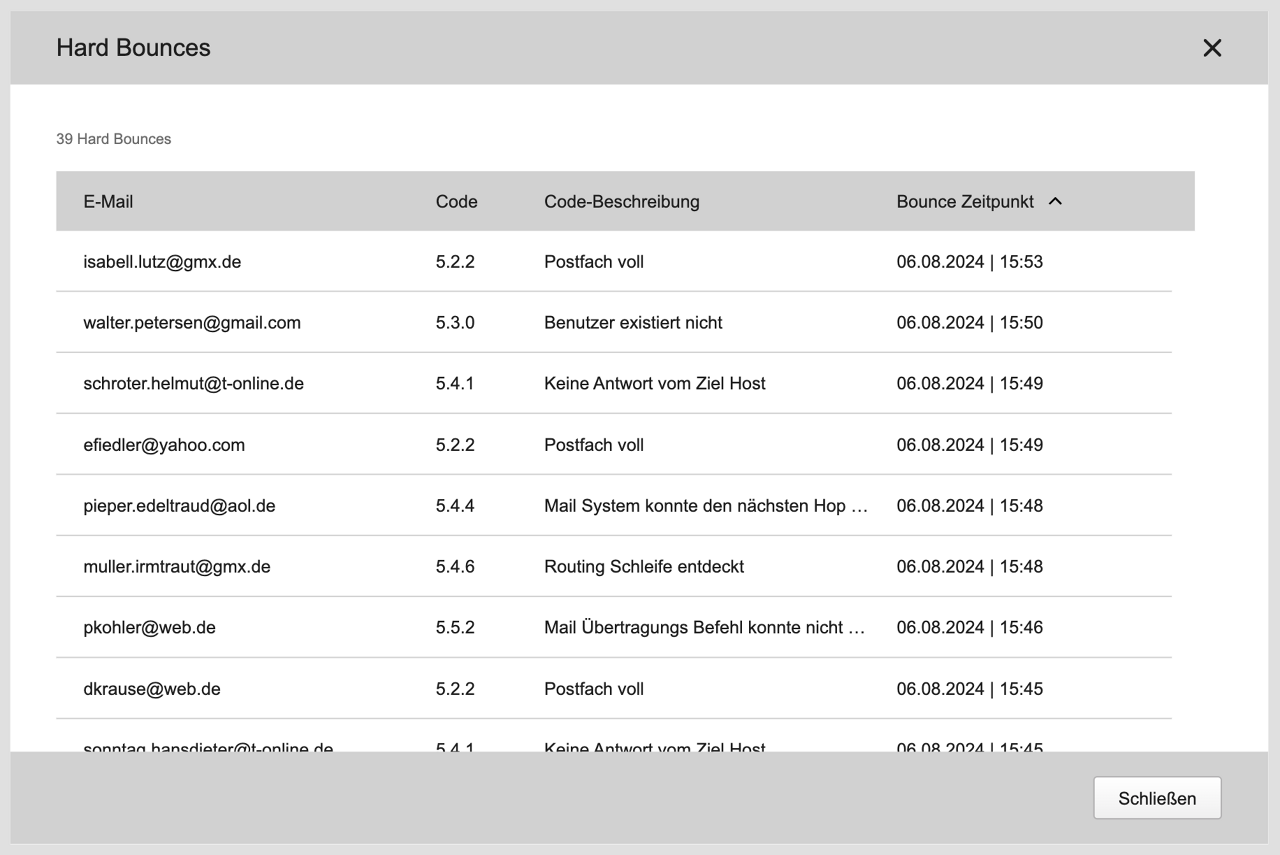
These error codes provide valuable feedback on why the bounce occurred and what you can do to prevent it in the future.
The following applies in principle:
- Do not purchase email addresses. Not only is this illegal, but the addresses are often outdated and no longer exist.
- Remove or archive invalid email addresses. mail2many automatically mail2many recipient addresses for you that have had one soft bounce or up to three hard bounces.
- Use opt-in mailings. The double opt-in procedure is mandatory under the GDPR and ensures that recipients expressly agree to receive your newsletters and that their email addresses exist.
- Check your data import. If you import a large number of recipients via a CSV or Excel file, or create them manually, mail2many checks the syntax of the recipient data.